Fairplay PhonePe Deposit Guide: Seamless, Secure, and Fast Payments
Introduction
In today’s digital economy, quick and reliable payment methods are essential for both consumers and service platforms. Fairplay, a leading online gaming and betting portal, has embraced modern payment solutions to enhance user experience. Among the options, PhonePe stands out as a popular UPI‑based wallet that offers instant transfers, high security, and widespread acceptance across India. This article provides a comprehensive overview of the fairplay official PhonePe deposit process, highlighting its advantages, detailed step‑by‑step instructions, security considerations, and best practices for trouble‑free transactions.
Why Choose PhonePe for Fairplay Deposits?
PhonePe’s integration with Fairplay brings several tangible benefits:
- Instantaneous transfers: Funds move from your bank to Fairplay within seconds, enabling you to start playing without delay.
- Broad accessibility: With over 300 million users, PhonePe supports most Indian banks and is available on both Android and iOS platforms.
- Robust security: Multi‑factor authentication, device binding, and UPI PIN verification protect every transaction.
- Low transaction fees: PhonePe typically charges minimal or no fees for UPI transfers, making it cost‑effective.
- User‑friendly interface: Simple navigation, quick QR code scanning, and clear transaction history simplify fund management.
Understanding the Fairplay PhonePe Deposit Workflow
The deposit workflow is designed to be straightforward while maintaining high security standards. Below is an outline of the key stages:
- Account preparation: Ensure you have an active Fairplay account and a verified PhonePe wallet linked to a bank account.
- Initiate the deposit: Log in to Fairplay, navigate to the “Deposit” section, and select PhonePe as your preferred method.
- Enter the amount: Input the exact amount you wish to transfer, keeping within the platform’s minimum and maximum limits.
- Generate a QR code or UPI ID: Fairplay will display a unique QR code or UPI ID for the transaction.
- Complete the payment on PhonePe: Scan the QR code or enter the UPI ID within the PhonePe app and confirm the payment using your UPI PIN.
- Verification and credit: Fairplay automatically verifies the transaction and credits your gaming wallet instantly.
- Confirmation: You’ll receive a confirmation message on both PhonePe and Fairplay, along with an updated balance.
Step‑by‑Step Guide to Making a PhonePe Deposit on Fairplay
1. Register or Log In to Your Fairplay Account
If you are a new user, you need to create an account. Visit the registration page and follow the prompts. Existing users can simply log in. For quick access, use the fairplay official login portal.
2. Access the Deposit Section
After logging in, locate the “Cashier” or “Deposit” tab, usually positioned at the top navigation bar. Click on it to view all available payment methods.
3. Choose PhonePe as Your Payment Method
Among the list of options, select “PhonePe.” The interface will present you with a field to enter the deposit amount and a button to generate a QR code or UPI identifier.
4. Enter the Deposit Amount
Input the desired amount, keeping within the platform’s stipulated limits (e.g., minimum ₹100, maximum ₹25,000 per transaction). Double‑check the figure to avoid errors.
5. Generate the QR Code or UPI ID
Click “Generate” to receive a unique QR code on your screen or a UPI ID specifically linked to your Fairplay account. This code is valid for a limited time, typically 10–15 minutes.
6. Open Your PhonePe App
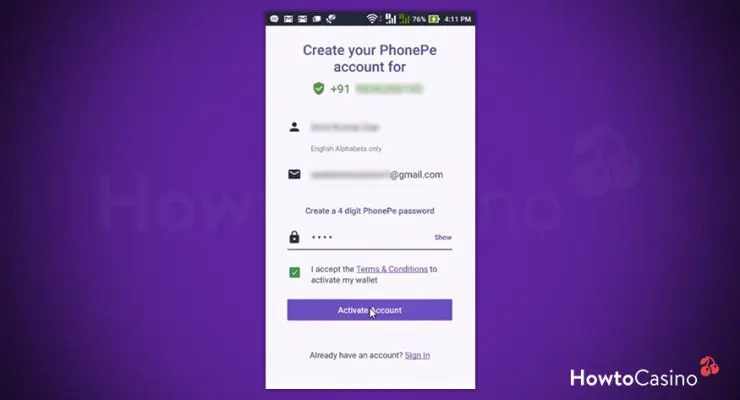
Launch the PhonePe application on your smartphone. If you haven’t installed it yet, download it from the Google Play Store or Apple App Store and complete the setup by linking your bank account.
7. Scan the QR Code or Enter the UPI ID
To scan, tap the “Scan QR” option within PhonePe and point your camera at the Fairplay QR code. If you prefer manual entry, select “Pay to UPI ID,” type the displayed UPI ID, and proceed.
8. Confirm the Payment
Enter the exact amount you entered on Fairplay, verify the beneficiary’s name (it should reflect Fairplay), and then authorize the transaction using your UPI PIN. PhonePe will process the payment instantly.
9. Await Automatic Verification
Fairplay’s system monitors incoming UPI transactions in real time. Within seconds, the platform will validate the payment and credit the amount to your gaming wallet.
10. Review Confirmation Messages
Both PhonePe and Fairplay will display a success message. In Fairplay, you can view the updated balance under the “My Wallet” section. If any discrepancy occurs, contact Fairplay’s support with the transaction ID.
Security Best Practices for PhonePe Deposits
While PhonePe already employs strong security mechanisms, users should adopt additional precautions to safeguard their accounts:
- Keep your UPI PIN confidential: Never share it with anyone, and change it periodically.
- Enable device lock: Use biometric or password protection on the smartphone hosting PhonePe.
- Verify QR codes: Ensure the QR code displayed on Fairplay matches the one you scan. Avoid scanning codes from untrusted sources.
- Monitor transaction alerts: Both PhonePe and Fairplay send push notifications for each transaction. Report any unauthorized activity immediately.
- Use a strong Fairplay password: Combine letters, numbers, and symbols, and avoid reusing passwords across sites.
Common Issues and How to Resolve Them
Even with a seamless system, users may occasionally encounter hiccups. Below are frequent challenges and recommended solutions:
Payment Not Reflected Instantly
If the deposit does not appear within a minute, check the transaction history on PhonePe for a “Success” status. If successful, wait up to five minutes for Fairplay’s backend to update. If still pending, contact Fairplay support with the PhonePe transaction reference.
QR Code Expired
The generated QR code has a limited validity window. If you miss the window, simply return to the deposit page, re‑enter the amount, and generate a fresh code.
Incorrect Amount Charged
Always double‑check the amount before confirming payment on PhonePe. If you mistakenly entered a higher amount, submit a support ticket with proof of the transaction; Fairplay may credit the excess amount as a bonus, depending on policy.
Failed Transaction due to Bank Limits
Some banks impose daily UPI limits. Verify your bank’s limit and ensure your deposit amount does not exceed it. Splitting larger deposits into multiple smaller transactions can circumvent this restriction.
Advantages of Registering Directly on Fairplay
Creating an account directly through the official portal streamlines the deposit process and unlocks additional features such as promotional bonuses, loyalty rewards, and personalized dashboards. For first‑time users, the fairplay official register page provides a quick sign‑up experience with minimal data entry.
Best Practices for Managing Your Fairplay Wallet
Effective wallet management ensures you maximize your gaming experience while maintaining financial discipline:
- Set a budget: Determine a monthly deposit limit and stick to it.
- Track transaction history: Regularly review both PhonePe and Fairplay statements to monitor spending.
- Utilize promotions wisely: Many platforms offer deposit match bonuses; plan deposits around these offers for extra value.
- Withdraw responsibly: When withdrawing winnings, follow the same secure processes, and verify withdrawal limits.
Future Outlook: Emerging Payment Trends on Fairplay
As the digital payments ecosystem evolves, Fairplay is exploring integration with emerging solutions such as Bharat QR, PayTM, and real‑time payment APIs. Nonetheless, PhonePe remains a cornerstone due to its massive user base and proven reliability. Users can expect continuous enhancements like faster settlement times, additional security layers, and richer UI experiences.
Conclusion
Depositing funds into Fairplay via PhonePe combines speed, convenience, and security, making it an ideal choice for Indian gamers and bettors. By following the step‑by‑step guide outlined above, adhering to best security practices, and promptly addressing any issues, users can enjoy a frictionless gaming experience. Whether you are a seasoned player or new to the platform, the seamless PhonePe deposit option empowers you to focus on what matters most—playing with confidence and peace of mind.